
You may receive the error below when your administrator account has been locked after too many failed logins.
As a security precaution, the user account has been locked out because there were too many logon attempts or password change attempts. Wait a while before trying again, or contact your system administrator or technical support.As a security precaution, the user account has been locked out because there were too many logon attempts or password change attempts. Wait a while before trying again, or contact your system administrator or technical support.
This error is caused by to many failed log in attempts to the VPS server which causes the account to get locked. We recommend that you secure your RDP connection to the VPS by means of the guide linked below:
How to secure Remote Desktop Protocol (RDP)
However you do also have the option to change or remove the Account Lockout Threshold and this can be done by navigating opening Group Policy Editor
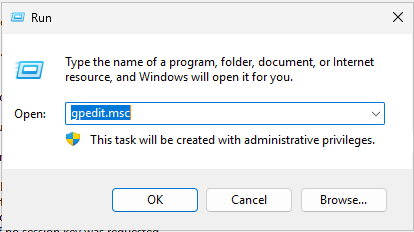
On your server, Right click Start > Run and in the run box type gpedit.msc and click Ok
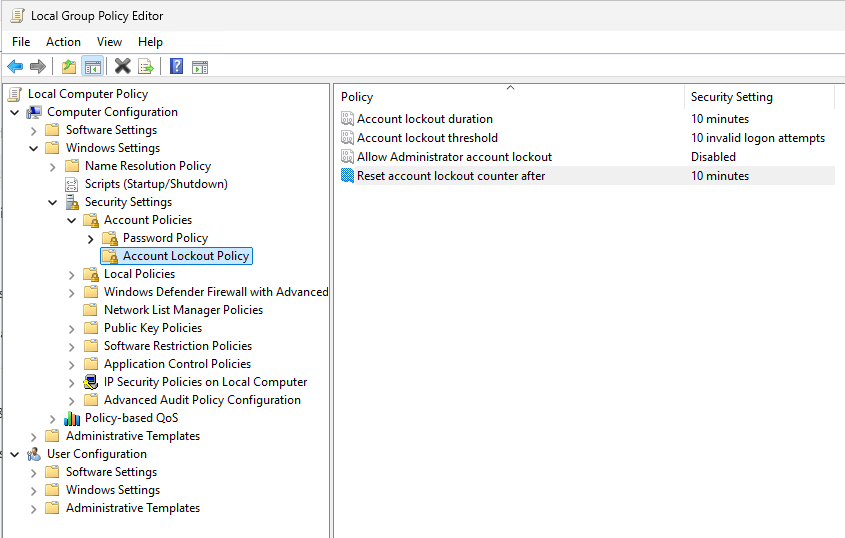
Expand Computer Configuration > Windows Settings > Security Settings > Account Policies > Account Lockout Policy > Account Lockout Threshold
Set Allow Administrator Account lockout to Disabled.
Please see the below Video that shows step by step how to adjust this policy: